
Move your tracking from the browser to the server
Server-side tracking routes analytics and ad data through your own server container before it’s sent to platforms like GA4, Google Ads, or Meta instead of letting the visitor’s browser ping each vendor directly. The result: more accurate data, faster pages, and complete control over what gets shared with whom.
Your client-side tracking is leaking data
In 2026, a typical client-side tracking setup is losing 15-30% of its events to ad blockers, browser privacy features, and Safari’s Intelligent Tracking Prevention. Server-side fixes that, and then some. Your analytics get more reliable, your site gets faster, and your ad platforms start optimizing against real data again.
We’ve been deploying server-side Google Tag Manager (sGTM) for clients across ecommerce, B2B, lead generation, and high-traffic content sites. As a Google Marketing Platform Certified Partner, it’s some of the most impactful analytics work we do.

How server-side tracking works
GA4, Google Ads, Meta, and every other platform routed through your server
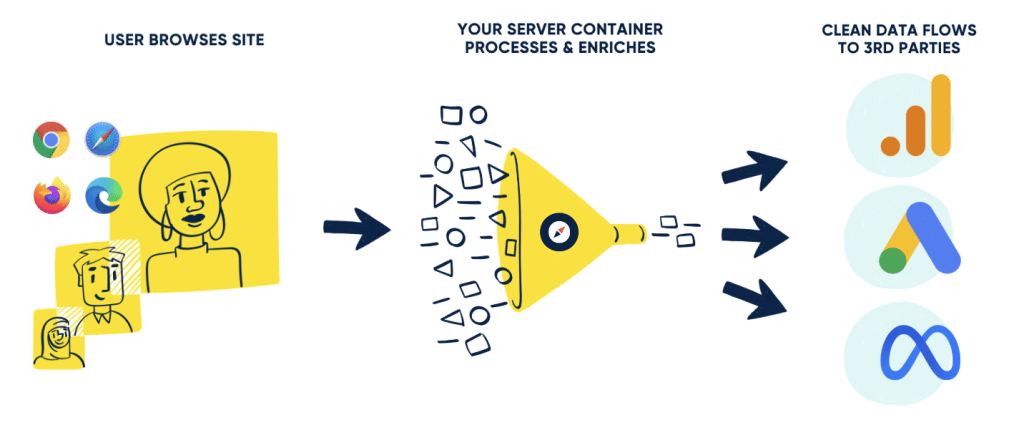
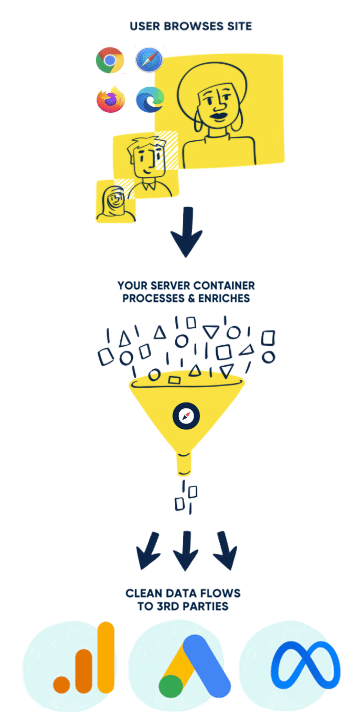
Client-side vs. server-side tracking
The traditional way to track website activity is “client-side” — your visitor’s browser loads a tag for every vendor (GA4, Meta Pixel, LinkedIn Insight Tag, Microsoft UET, and so on), and each one sends their own data stream independently. It’s how analytics has worked for two decades, and it’s increasingly broken.
Server-side flips the model. Your visitor’s browser sends one lightweight event to your own server, and your server decides what to do with it — what to enrich, what to strip, where to forward it, and in what format.
| Client-side (traditional) | Server-side (sGTM) | |
|---|---|---|
| Where tags fire | In the visitor’s browser | On your own server container |
| Ad blocker & ITP impact | High — 15–30% data loss typical | Minimal — events bypass blockers |
| Page speed impact | Multiple third-party scripts | One lightweight first-party endpoint |
| Cookie longevity (Safari) | Capped at 7 days by ITP | Server-set, full duration |
| Control over what’s sent | Limited — every vendor sees everything | Full — strip, hash, enrich, route per vendor |
| Offline conversion imports | Requires a complicated multi-vendor setup | Built in |
| Implementation effort | Lower | Higher — Pilot handles it |
| Ongoing cost | Free | ~$20–$200/mo for cloud servers |
What we set up for you
GA4 server-side tracking
Route all GA4 events through your server container for cleaner data, fewer blocked sessions, and accurate session unification across devices.
Google Ads & Meta server-side conversions
Server-side conversions, enhanced conversions, and Meta CAPI alongside your existing Pixel with hashed first-party data for stronger match rates and more reliable Smart Bidding signals. Plus offline conversion imports from your CRM so bidding optimizes against real revenue, not raw form fills.
First-party cookie management
Server-side tracking alone doesn’t beat Safari’s 7-day ITP cap. For WordPress clients, we pair sGTM with a cookie-setter on your actual web origin with a custom plugin we built, so attribution cookies (UTM parameters, GCLID, FBCLID) hold for the full attribution window.
Data enrichment & PII handling
Strip, hash, or transform fields before they leave your server. Useful for compliance, junk-data filtering, or enriching events with server-known context like user tier, lifetime value bucket, or logged-in status.
Working in healthcare or another HIPAA-regulated space?
Server-side tracking is the foundation of HIPAA-compliant analytics — but compliance requires significant additional guardrails, a signed BAA, and ongoing monitoring. For that, we built Sounder, our managed HIPAA-compliant analytics service.

Pilot’s server-side implementation process
Audit your current tracking — We review your existing GTM container, GA4 property, and ad platform pixels to map what’s tracking, what’s broken, and how much data you’re losing to blockers and ITP.
Architect your tracking plan — We define the events, conversions, parameters, consent rules, and routing logic. We decide which data goes to which platform, in what shape.
Provision your server container — We stand up sGTM on a custom subdomain of your domain (e.g. track.yourbrand.com). Stape’s Google Cloud servers are the default infrastructure we prefer to use.
Migrate tags and test — We move tags from client-side to server-side incrementally, with parallel tracking and rigorous QA before switching over completely.
Integrate ad platforms — Google Ads enhanced conversions, Meta CAPI, LinkedIn, Microsoft Ads, TikTok, and any offline conversion imports from your CRM.
Hand it off — or stick around — When setup is done, you own the container. We’re happy to walk away, or stay on for ongoing maintenance and new event tracking as your business evolves.
They were thoughtful and patient… they’ve been so great to work with and learn from, even working directly with our vendors to troubleshoot tracking issues on their end, basically improving everything they touch.
Marketing Strategist, United Way of Greater Cincinnati
Server-Side Tracking Pricing
Server-side tracking is a one-time setup project. You pay us to design, build, and migrate your tracking. When we’re done, you own the server container outright. The only recurring fees you pay will be to the server provider, and we recommend our partner Stape for being a great reliable platform and also very competitive with their pricing.
One-time setup
Pricing scales with the complexity of your tracking — number of events, ad platforms, CRM integrations, ecommerce data, and so on. Most projects start in the low five figures. We’ll scope yours after a quick discovery call.
Ongoing infrastructure
Server containers run on Google Cloud via Stape for between $20 to $200 per month, billed directly by Stape. Heavy-traffic sites may run higher.
Optional ongoing support
Many clients keep us on a small monthly retainer for new event tracking, ad platform integrations, and general analytics maintenance as their stack evolves. Optional, not required.
The platforms we integrate server-side












Server-Side Tracking FAQ
Server-side tracking routes analytics and ad events through your own server container (typically on a custom subdomain like track.yourbrand.com) before they’re forwarded to platforms like GA4, Google Ads, and Meta. Instead of the visitor’s browser pinging each vendor directly, your server acts as a middleman, giving you full control over what data is sent, in what format, and to whom.
Client-side tracking runs entirely in the visitor’s browser, which means every ad blocker, privacy setting, and browser update can interfere with it. Server-side moves the heavy lifting off the browser and onto your server, where blockers can’t reach it. The trade-off is implementation complexity; server-side requires more setup, which is why most teams bring in a partner to do it.
Server-side tracking can absolutely be GDPR and CCPA compliant. In many ways, it makes compliance easier because you are in full control over what data leaves your domain. Consent management, IP anonymization, data minimization, and PII stripping all happen on your server before anything reaches Google or Meta.
No. Server-side tracking works with WordPress, Shopify, Webflow, custom-built sites — anything that supports Google Tag Manager. We don’t touch your site infrastructure; we just set up the server container alongside it.
Most projects take four to eight weeks, depending on the complexity of your tracking and how many ad platforms and integrations are involved.
The underlying technology is the same: server-side GTM is the foundation of both. But our HIPAA-compliant tracking (offered under our Sounder brand) adds the additional guardrails, BAA, and ongoing monitoring that healthcare organizations need. This service is for everyone else.
Ready to move your tracking to the server?
Complete the form to schedule a time to talk, or give us a call at 773-809-5002 and let’s chat for 15 minutes about your tracking setup.
"*" indicates required fields